
The AI is in the room. The data never leaves it.
MonAI is private, on-prem AI built for UK financial advisory firms. Process pension transfers, annual reviews and client documents locally: no cloud uploads, no third-party AI data transfer, no usage-based pricing.
A 15 minute walkthrough on your own documents. No card and no commitment.
Two ways to run the full product.
The cloud workspace is the full self-serve product, for firms whose compliance allows it. The private version runs on a machine in your office, for firms whose documents have to stay in the building. Same workflow, templates, audit trail and outputs. The only difference is where the documents sit.
On premises runs on the device, so it is slightly slower, and it can be slightly less accurate than the cloud. Every field carries a confidence score and source evidence, and a mandatory verification and sign off step runs before anything is used.
What happens next
Five private machines ready to deploy. Three steps from question to a machine in your office.
1. Reply or ask
Tell us it is the private setup
Take the three-question check, or send a note. We will send the setup details and what the box needs.
2. 15 minute walkthrough
See it on your own documents
We show you the workflow, the source links and the approval step. You can use a real document from your firm.
3. Install and train
Under 2 hours in your office
If it fits, we install the box, connect it to your network and train the team. No IT project.
What Is On-Premises AI for Financial Services?
On-premises AI means running artificial intelligence models on hardware physically inside your office, rather than sending data to external cloud servers. For UK financial advisory firms, this is critical: your client pension statements, investment records, and personal data stay under your direct control at all times.
Unlike cloud-based AI tools that require uploading sensitive documents to third-party servers, on-prem AI processes everything locally. MonAI delivers this through the MonAI Box: a compact device installed in your office that runs AI-powered document workflows without any internet dependency for data processing.
Why On-Prem AI Matters for Advisory Firms
- →Data sovereignty: Client data stays inside your network, never touching external servers
- →Local by design: Client data is processed inside your own network, with no third-party AI data transfer
- →Evidence preserved: Source links and audit trails built into every output
- →Human approval loop: Your team reviews and approves before any output is used
- →Predictable costs: Fixed monthly pricing, no per-API-call surprises
Built for Regulated Workflows
MonAI isn't a chat tool. It's a workflow engine that turns document chaos into structured outputs your team can trust. Export from your CRM, upload supporting documents, click once, and get a clean prep document ready for adviser review.
On-Premises vs Cloud AI
Why UK advisory firms choose local processing
MonAI On-Prem
- Data stays in your office
- No third-party data processing
- Fixed monthly cost
- Unlimited document processing
- Human approval on every output
- Built for UK financial documents
Cloud AI Tools
- ✗ Data sent to external servers
- ✗ Third-party data processing
- ✗ Pay-per-use pricing spikes
- ✗ Costs scale with volume
- ✗ Generic responses
- ✗ Not built for advisory workflows
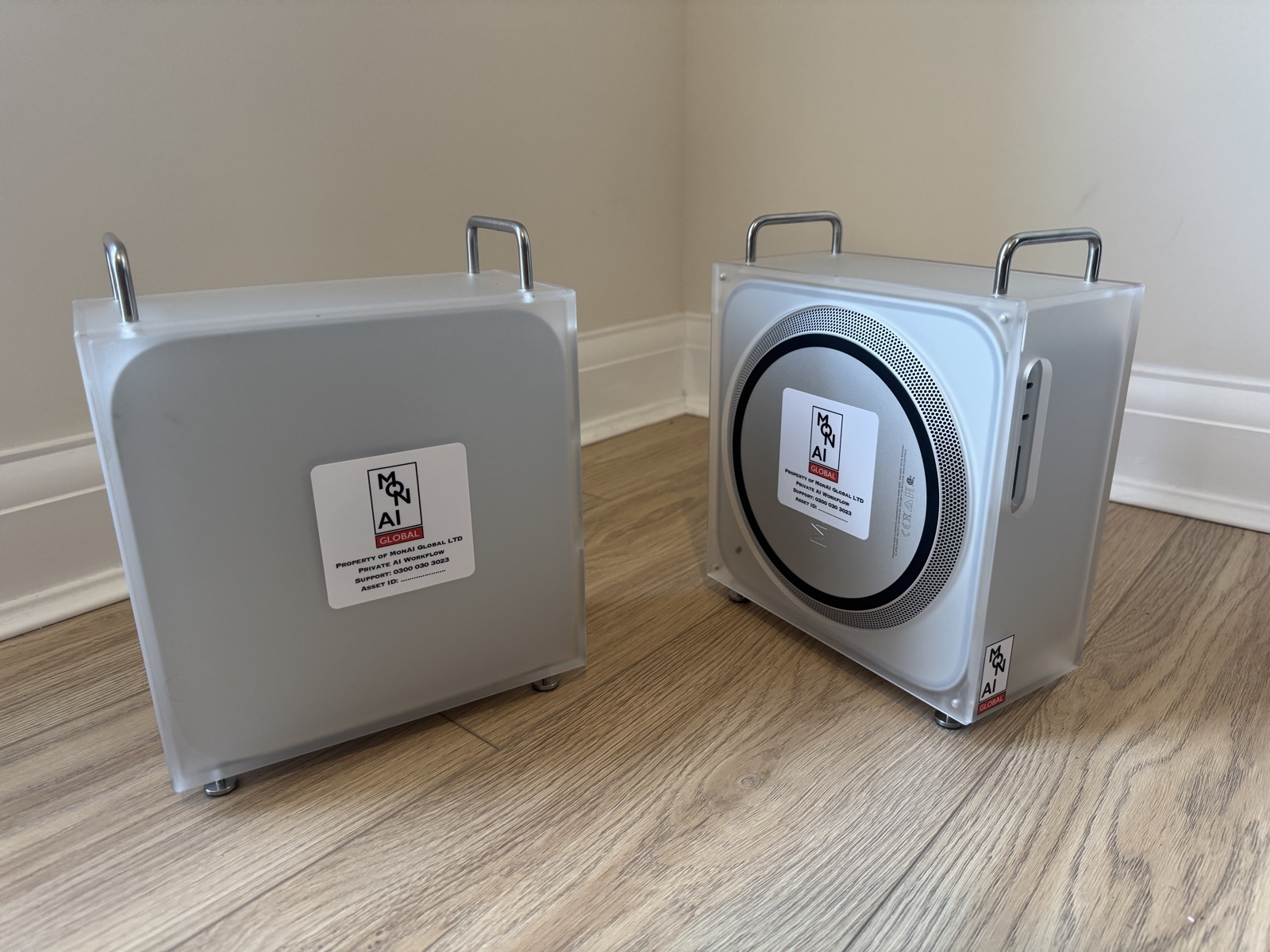
Your own AI. In your office.
A Mac Studio running MonAI software. Deployed in your office. No cloud. No data processor. No third party sees your client files.
Private by design
Client data stays on site. You keep control and auditability.
Built for workflow
Optimised for repeatable admin tasks, not generic chat.
Fast turnaround
Turn hours of admin into minutes, with confidence scores and a verification step before anything is used.
Install + support
We set it up to match your exact workflow, then refine it.
On-Premises AI: Common Questions
What does on-premises AI mean for financial services?+
How is on-prem AI different from cloud AI tools?+
How does on-premises AI handle client data for financial advisors?+
What hardware is needed for on-premises AI?+
How much does on-premises AI cost compared to cloud AI?+
Proof from real advisory operations
“That in itself has saved us a lot of time at the back end.”
“We got through about 30. Usually get through ten.”
“It's sped up time to us, so we've got more capacity to take more on.”
“It is slick, it's doing it all, it's saving loads of time.”
“We don't need another member of staff. We've saved costs.”
“The bit where this helps is the annual review preps.”
See the private setup on your own documents.
A 15 minute walkthrough. We show you the output, the source links and the approval step on your own documents. No card and no commitment.
Prefer to test first? Start free in the cloud workspace.